This is important for professionalism, and cohesion amongst all HIV alliance employees. Please review the APPROVED email signature standards and update your accordingly. These should match in font size, color, and type which is primarily Arial Regular.
- Your name should be in Arial Regular size 14.
- Your title, contact info and links should be in Arial Regular size 10 font.
- Your confidentiality statement should be in Arial Regular size 8.
Those in the Eugene office: Check to make sure your address does not include the A (1195A). Since we do not lease the back end of our office any longer, there is no 1195A and 1195B. You may remove the A from your address.
Here is what your signatures should look like. You are welcome to cut and paste the signature below that aligns with your job. There are 3 signature logo files attached to this document for your downlooad to use in your signature (HIV Alliance, Alliance for Community Wellness and Oak Program for Housing. If you're unsure which one you should use, ask your Manager.
General Use signature:
Name (pronouns)
Title

1195 City View St.
Eugene, OR 97402
P: 541-342-5088 ext. 000
C: 000-000-0000
F: 541-342-1150
yourname@allianceor.org
Supporting individuals living with HIV/AIDS and preventing new infections.
Information contained in this message may be privileged and confidential and protected from disclosure. If the reader of this message is not the intended recipient, or an employee or agent responsible for delivering this message to the intended recipient, you are hereby notified that any dissemination, distribution or copying of this communication is strictly prohibited. If you have received this communication in error, please notify us immediately by replying to the message and deleting it from your computer.
Confidential Use signature:
Name (pronouns)
Title
1195 City View St.
Eugene, OR 97402
P: 541-342-5088 ext. 000
C: 541-000-0000
F: 541-342-1150
yourname@allianceor.org
Information contained in this message may be privileged and confidential and protected from disclosure. If the reader of this message is not the intended recipient, or an employee or agent responsible for delivering this message to the intended recipient, you are hereby notified that any dissemination, distribution or copying of this communication is strictly prohibited. If you have received this communication in error, please notify us immediately by replying to the message and deleting it from your computer.
Alliance for Community Wellness staff signature:
Name (pronouns)
Title

1195 City View St.
Eugene, OR 97402
P: 541-342-5088 ext. 000
C: 541-000-0000
F: 541-342-1150
yourname@allianceor.org
Information contained in this message may be privileged and confidential and protected from disclosure. If the reader of this message is not the intended recipient, or an employee or agent responsible for delivering this message to the intended recipient, you are hereby notified that any dissemination, distribution or copying of this communication is strictly prohibited. If you have received this communication in error, please notify us immediately by replying to the message and deleting it from your computer.
Oak Housing Program signature:
Name (pronouns)
Title

1195 City View St.
Eugene, OR 97402
P: 541-342-5088 ext. 000
C: 541-000-0000
F: 541-342-1150
yourname@allianceor.org
Information contained in this message may be privileged and confidential and protected from disclosure. If the reader of this message is not the intended recipient, or an employee or agent responsible for delivering this message to the intended recipient, you are hereby notified that any dissemination, distribution or copying of this communication is strictly prohibited. If you have received this communication in error, please notify us immediately by replying to the message and deleting it from your computer.
Instructions for updating your signature:
Update this template with your personal information and then update your signature in Outlook by following these steps.
How to Update your Signature on the Outlook 365
- Open Outlook.
- Click the Settings gear from the options in the top right corner.

- Click the second sub-option down called “Compose and Reply” and your signature box will be there.
- Click “+ New Signature” if this is your first time, or if you want to add a secondary signature (like in cases where you might send regular emails and send confidential emails). Otherwise, click in the body of the signature box to edit an existing signature.
| |
-
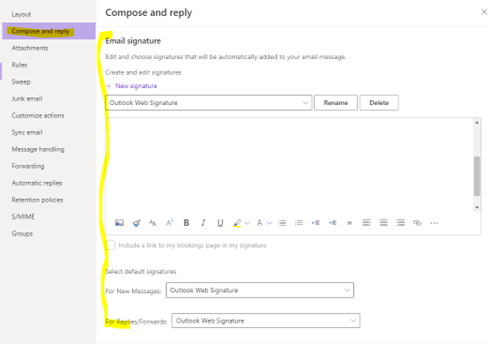
- Cut and paste one of the signatures above into your signature box.
- To add your preferred logo to your signature, place your cursor where you want the logo (between your title and your office address) and click on the insert picture button (mountain graphic, first option on the list, highlighted here)
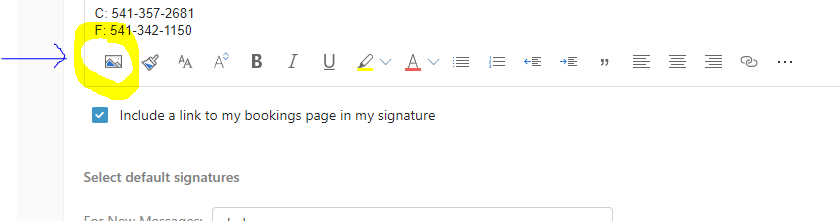
- The Logo is attached to this document, download the appropriate one and add it to your signature and choose save.
Additional Information:
- You can email Jade, Jlazaris@allianceor.org with questions or click the "Book time to meet with me" button at the bottom of her signature and she can go over it really quick in Zoom.
- You are welcome to include statements next to your contact info like call/text next to a preferred cell number, or a note about the best way to reach you, etc. but you will need to remove any rainbow logos, personal statements, and additions to your signature. You are also welcome to keep any statements regarding a disability such as hard of hearing. If you have questions about additional accommodation statements, please see your manager for approval.
- Some Apple products, or the Outlook app on your phone may look different than these instructions. If you're getting caught up because of this, book time with Jade Lazaris and she can help you.


Was this article helpful?
That’s Great!
Thank you for your feedback
Sorry! We couldn't be helpful
Thank you for your feedback
Feedback sent
We appreciate your effort and will try to fix the article