To add a public folder/calendar in Outlook on the web at outlook.office.com
On the left side of your screen, right click on your email address.
Then choose Add public folder to favorites.
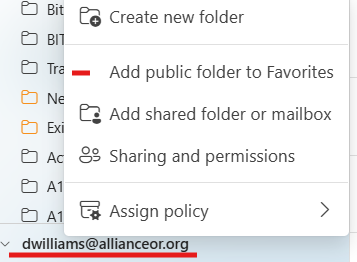
That will bring a screen out from the right hand side of your screen.
Expand where it says All Public Folders.
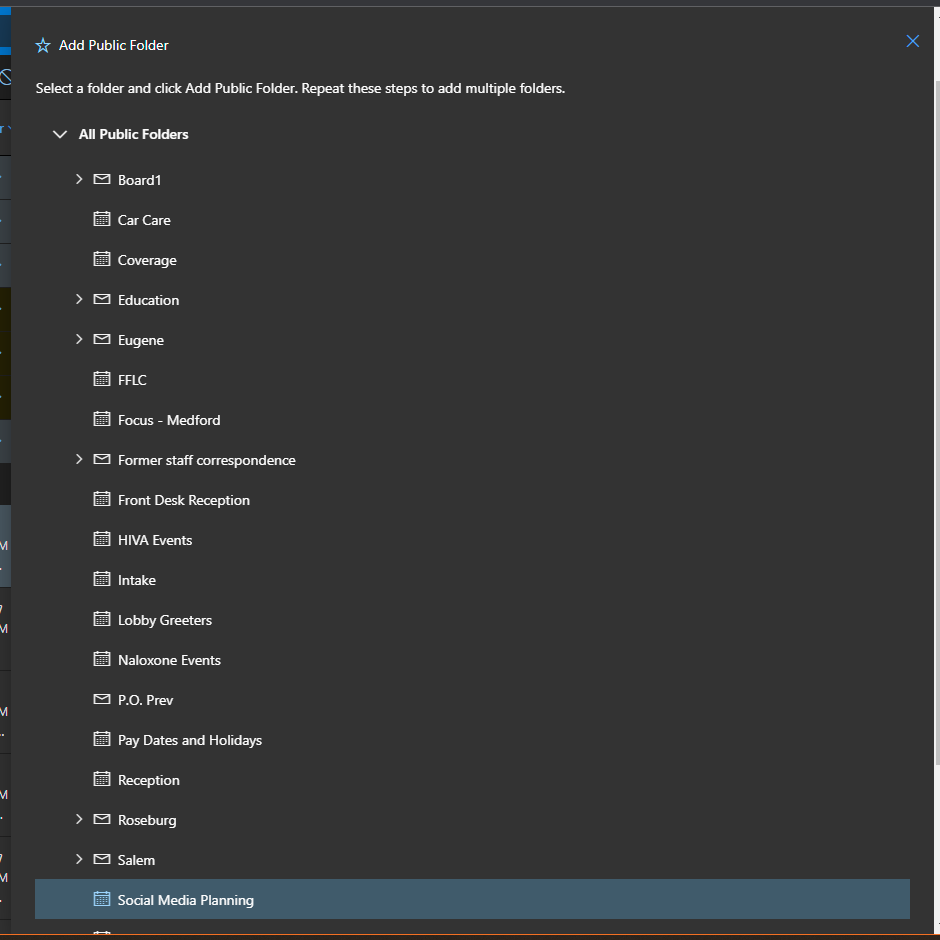
In order to be able to view those calendars without having to go through these steps again, you just need to click one of the calendars in that list.
Once you select it at the very top of the screen is a star to Add to Favorites.
Click there and it adds that calendar to other calendars in your outlook.office.com calendar view.
Be patient it may not show up immediately, it can take a bit, up to 30 min. to finally be visible in your calendar list.
Was this article helpful?
That’s Great!
Thank you for your feedback
Sorry! We couldn't be helpful
Thank you for your feedback
Feedback sent
We appreciate your effort and will try to fix the article